

SmartTMS Technician is the mobile companion for field technicians managing installation orders. Built for speed and reliability, it keeps your team connected and your workflow moving.
REAL-TIME ORDER MANAGEMENT
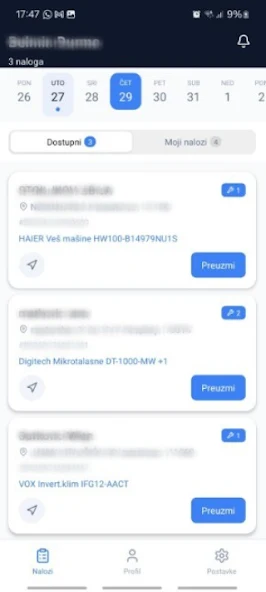
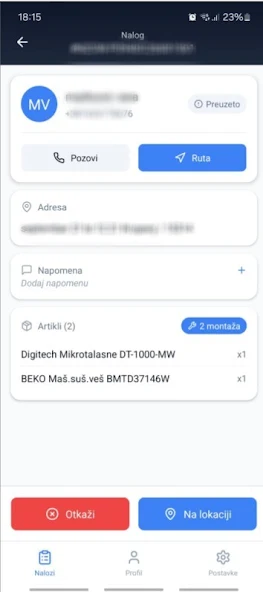
Browse available installation orders and claim them instantly. See order details including customer info, address, articles, and dispatcher notes — all in one place. When another technician takes an order, you're notified immediately so you never waste time on unavailable jobs.
STREAMLINED WORKFLOW
Move through your workday with a clear, guided process:
- View available orders for any date
- Assign orders to yourself with one tap
- Mark arrival at customer location
- Complete the job and add technician notes
- Reject orders with documented reasons when needed
MY ORDERS DASHBOARD
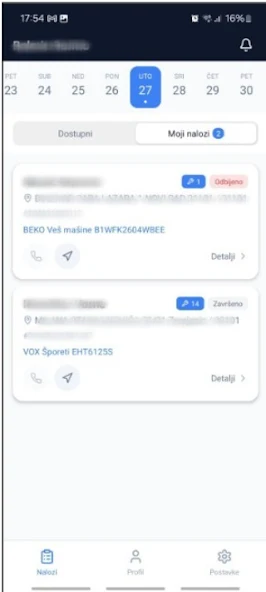
Keep track of everything assigned to you. Your personal dashboard shows all your active and completed orders for the selected day, giving you a clear picture of your workload at a glance.
STAY IN SYNC
Live WebSocket connection keeps your order list current. No manual refreshing needed — when dispatchers assign new orders or other technicians claim jobs, your list updates automatically.
WORKS OFFLINE
Smart caching ensures you can still review your orders and job details even when connectivity is limited. Data syncs automatically when you're back online.
BUILT FOR TECHNICIANS
- Clean, fast interface designed for field use
- Dark mode for low-light environments
- Haptic feedback for key actions
- Multi-language support (English, Bosnian, Serbian)
- Date-based order filtering
- Pull-to-refresh for instant updates
SECURE ACCESS
Enterprise-grade authentication with encrypted credential storage. Your data stays protected with automatic session management and secure token handling.SmartTMS Technician is part of the SmartTMS platform — a comprehensive transportation and installation management system built by InfoStudio.
REAL-TIME ORDER MANAGEMENT
Browse available installation orders and claim them instantly. See order details including customer info, address, articles, and dispatcher notes — all in one place. When another technician takes an order, you're notified immediately so you never waste time on unavailable jobs.
STREAMLINED WORKFLOW
Move through your workday with a clear, guided process:
- View available orders for any date
- Assign orders to yourself with one tap
- Mark arrival at customer location
- Complete the job and add technician notes
- Reject orders with documented reasons when needed
MY ORDERS DASHBOARD
Keep track of everything assigned to you. Your personal dashboard shows all your active and completed orders for the selected day, giving you a clear picture of your workload at a glance.
STAY IN SYNC
Live WebSocket connection keeps your order list current. No manual refreshing needed — when dispatchers assign new orders or other technicians claim jobs, your list updates automatically.
WORKS OFFLINE
Smart caching ensures you can still review your orders and job details even when connectivity is limited. Data syncs automatically when you're back online.
BUILT FOR TECHNICIANS
- Clean, fast interface designed for field use
- Dark mode for low-light environments
- Haptic feedback for key actions
- Multi-language support (English, Bosnian, Serbian)
- Date-based order filtering
- Pull-to-refresh for instant updates
SECURE ACCESS
Enterprise-grade authentication with encrypted credential storage. Your data stays protected with automatic session management and secure token handling.SmartTMS Technician is part of the SmartTMS platform — a comprehensive transportation and installation management system built by InfoStudio.
Updated on
Jun 03, 2026
AUTO_AND_VEHICLES
