LumaFusion: The Ultimate Storytelling Experience for Video Editing in a 1-time purchase.
Welcome to the App Store’s “App of the Year” for 2021 and the recipient of the Editors’ Choice Award! The gold standard for storytellers worldwide. Offering a fluid, intuitive, touch-screen editing experience.
PROFESSIONAL EDITING MADE EASY
• Six video/audio or graphic tracks: Create multiple layer edits with smooth handling of 4K ProRes and HDR media.
• Six Additional audio tracks: Build your soundscape.
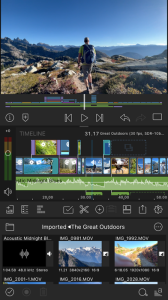
• The ultimate Timeline: Fluent editing using the world’s most flexible track-based AND magnetic timeline.
• Loads of transitions: Keep your story moving.
• External Monitor Preview: View on a big screen.
• Markers, tags and notes: Stay organized.
• Voiceover: Record VO while playing your movie.
LAYERED EFFECTS AND COLOR CORRECTION
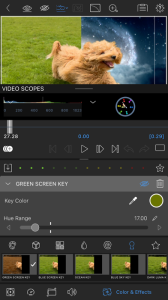
• Green screen, luma, and chroma keys: For creative compositing.
• Lock & Load Video Stabilizer: Steady your footage.
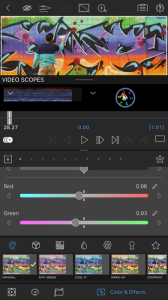
• Powerful color correction: Create your own look.
• Video Waveform, vector and histogram scopes.
• LUTs: Import and apply multiple .cube or .3dl LUTs.
• Unlimited keyframes: Animate effects with precision.
• Customizable text and effect presets: Save and share your favorite animations and looks.
• Grids and Guides: Precisely align elements with Title-Safe, Action-Safe and horizon line.
ADVANCED AUDIO CONTROL
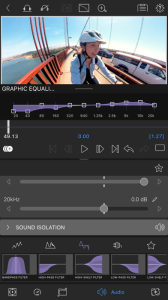
• Graphic EQ, Parametric EQ and Voice Isolation: Fine-tune audio.
• Keyframe audio levels, panning, and EQ: Craft seamless mixes.
• Stereo and Dual-mono audio support: For interviews with multiple mics on one clip.
• Audio Ducking: Balance your music and dialogue.
• Third-party audio plugins: Enhance your sound.
CREATIVE TITLES AND MULTILAYER TEXT
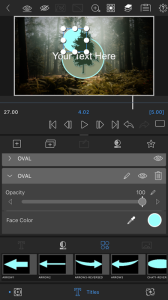
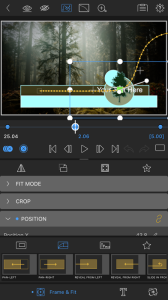
• Multilayer titles: Combine shapes, images, and text into your graphic.
• Customizable fonts, colors, borders, and shadows: Design eye-catching titles.
• Import custom fonts: Strengthen your brand.
• Save and share title presets: Perfect for collaboration.
PROJECT FLEXIBILITY AND MEDIA LIBRARY
• Aspect ratios for all uses: From widescreen cinema to social media.
• Frame rates from 18fps to 240fps: Flexibility for any workflow.
• Edit from Photos, Frame.io, and directly from USB-C drives: Access your content anywhere.
• Import media from cloud storage: Wherever you store it.
SHARE YOUR MASTERPIECES
• Control resolution, quality, and format:
• Share movies to social media, local storage or cloud storage.
• Edit on multiple devices: Seamlessly transfer projects.
ENHANCED FEATURES (purchase individually, or get them ALL as part of the Creator Pass subscription - see below)
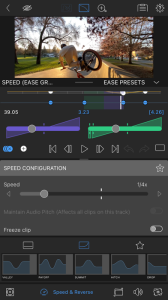
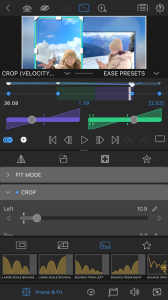
• Speed Ramping and Enhanced Keyframing - Create speed ramps, Bézier curves, and easing with this one-of-a-kind, easy to use feature.
• XML Export: Send your project to Final Cut Pro for Mac
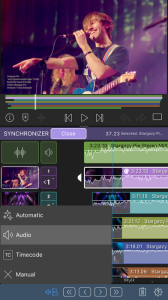
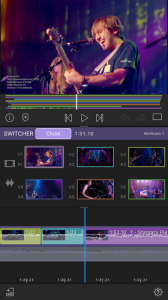
• Multicam Studio: Synchronize 6 cameras or audio and tap to switch angles
CREATOR PASS SUBSCRIPTION
• Get full access to Storyblocks for LumaFusion: Millions of High-quality royalty-free music, SFX, and videos, PLUS get ALL the Enhanced Features above.
LumaFusion: The Ultimate Storytelling Experience for Video Editing in a 1-time purchase.
Welcome to the App Store’s “App of the Year” for 2021 and the recipient of the Editors’ Choice Award! The gold standard for storytellers worldwide. Offering a fluid, intuitive, touch-screen editing experience.
PROFESSIONAL EDITING MADE EASY
• Six video/audio or graphic tracks: Create multiple layer edits with smooth handling of 4K ProRes and HDR media.
• Six Additional audio tracks: Build your soundscape.
• The ultimate Timeline: Fluent editing using the world’s most flexible track-based AND magnetic timeline.
• Loads of transitions: Keep your story moving.
• External Monitor Preview: View on a big screen.
• Markers, tags and notes: Stay organized.
• Voiceover: Record VO while playing your movie.
LAYERED EFFECTS AND COLOR CORRECTION
• Green screen, luma, and chroma keys: For creative compositing.
• Lock & Load Video Stabilizer: Steady your footage.
• Powerful color correction: Create your own look.
• Video Waveform, vector and histogram scopes.
• LUTs: Import and apply multiple .cube or .3dl LUTs.
• Unlimited keyframes: Animate effects with precision.
• Customizable text and effect presets: Save and share your favorite animations and looks.
• Grids and Guides: Precisely align elements with Title-Safe, Action-Safe and horizon line.
ADVANCED AUDIO CONTROL
• Graphic EQ, Parametric EQ and Voice Isolation: Fine-tune audio.
• Keyframe audio levels, panning, and EQ: Craft seamless mixes.
• Stereo and Dual-mono audio support: For interviews with multiple mics on one clip.
• Audio Ducking: Balance your music and dialogue.
• Third-party audio plugins: Enhance your sound.
CREATIVE TITLES AND MULTILAYER TEXT
• Multilayer titles: Combine shapes, images, and text into your graphic.
• Customizable fonts, colors, borders, and shadows: Design eye-catching titles.
• Import custom fonts: Strengthen your brand.
• Save and share title presets: Perfect for collaboration.
PROJECT FLEXIBILITY AND MEDIA LIBRARY
• Aspect ratios for all uses: From widescreen cinema to social media.
• Frame rates from 18fps to 240fps: Flexibility for any workflow.
• Edit from Photos, Frame.io, and directly from USB-C drives: Access your content anywhere.
• Import media from cloud storage: Wherever you store it.
SHARE YOUR MASTERPIECES
• Control resolution, quality, and format:
• Share movies to social media, local storage or cloud storage.
• Edit on multiple devices: Seamlessly transfer projects.
ENHANCED FEATURES (purchase individually, or get them ALL as part of the Creator Pass subscription - see below)
• Speed Ramping and Enhanced Keyframing - Create speed ramps, Bézier curves, and easing with this one-of-a-kind, easy to use feature.
• XML Export: Send your project to Final Cut Pro for Mac
• Multicam Studio: Synchronize 6 cameras or audio and tap to switch angles
CREATOR PASS SUBSCRIPTION
• Get full access to Storyblocks for LumaFusion: Millions of High-quality royalty-free music, SFX, and videos, PLUS get ALL the Enhanced Features above.