The interface is good and the shopping is super smooth.
More
12efa asd
July 22, 2024
Great experience, great deals.
More
App Privacy
The developer indicated that the app’s privacy practices may include handling of data as described below. For more information, see the developer’s privacy policy.。
Data Linked to You
The following data may be collected and linked to your identity:
Create, edit, and collaborate on spreadsheets with the Google Sheets app. With Sheets you can:
* Create new spreadsheets or edit existing ones
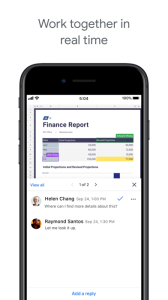
* Share spreadsheets and collaborate with others in the same spreadsheet at the same time
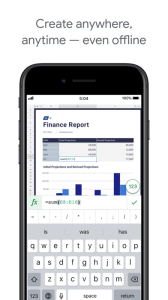
* Work anywhere, anytime - even offline
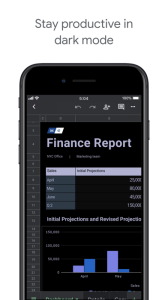
* Format cells, enter/sort data, view charts, insert formulas, use find/replace, and more
* Never worry about losing your work -- everything is automatically saved as you type
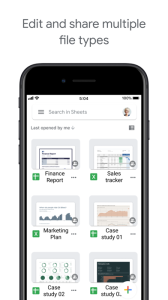
* Open, edit, and save Excel files
Google Sheets is part of Google Workspace: where teams of any size can chat, create, and collaborate.
Google Workspace subscribers have access to additional Google Sheets features, including:
* Easily add collaborators to projects, see changes as they occur, receive notifications for edits that happen while you’re away, and chat with colleagues in the same spreadsheet. All changes are automatically saved as you make them. And with offline access, you can create, view, and edit files wherever and whenever
* Get insights fast, powered by Google AI
* Work seamlessly across Sheets and Excel
* Maintain control with enterprise-grade security
* Analyze data from other business-critical tools
* Build custom solutions
LOADLY.IOTips.
1. This application comes from a third-party product and its content is not controlled by LOADLY, so please screen it carefully and install it with caution. LOADLY internal testing service platform provides application testing hosting and application crash detection services for third-party applications. LOADLY only provides internal testing support for third-party applications, and does not involve any manual editing or collation, nor does it participate in the content development or external operation of any application, and does not have any affiliation with third-party applications, and does not provide any guarantee or commitment.
2. Please check the quality of applications carefully, and do not install applications from unreliable sources because of spam, emails, text descriptions, etc. Please make your own judgement and install trusted applications based on the source of the application installation link. LOADLY is not responsible for the rules, policies, or specific content of applications published through LOADLY or links to other sites displayed on LOADLY. LOADLY shall not be liable for any investment or purchase made as a result, click here to see more.
Tips.
1. This application comes from a third-party product and its content is not controlled by LOADLY, so please screen it carefully and install it with caution. LOADLY internal testing service platform provides application testing hosting and application crash detection services for third-party applications. LOADLY only provides internal testing support for third-party applications, and does not involve any manual editing or collation, nor does it participate in the content development or external operation of any application, and does not have any affiliation with third-party applications, and does not provide any guarantee or commitment.
2. Please check the quality of applications carefully, and do not install applications from unreliable sources because of spam, emails, text descriptions, etc. Please make your own judgement and install trusted applications based on the source of the application installation link. LOADLY is not responsible for the rules, policies, or specific content of applications published through LOADLY or links to other sites displayed on LOADLY. LOADLY shall not be liable for any investment or purchase made as a result, click here to see more.