The interface is good and the shopping is super smooth.
More
12efa asd
July 22, 2024
Great experience, great deals.
More
App Privacy
The developer indicated that the app’s privacy practices may include handling of data as described below. For more information, see the developer’s privacy policy.。
Data Linked to You
The following data may be collected and linked to your identity:
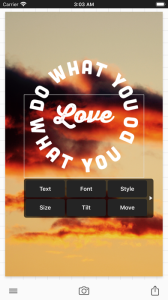
Phonto is a simple app that allows you to add text to pictures.
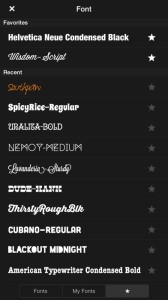
・ More than 400 fonts are available.
・ You can install other fonts.
・ Text size is changeable.
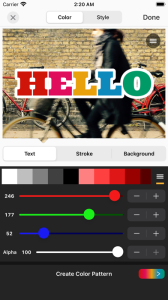
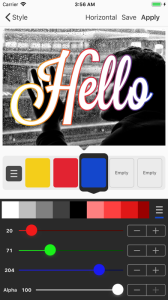
・ Text color is changeable.
・ Text gradient is changeable.
・ Text's stroke color is changeable.
・ Text's shadow color is changeable.
・ Text's background color is changeable.
・ Text is rotatable.
・ Text kerning is changeable.
・ Line spacing is changeable.
・ Curved text.
・ Perspective text.
・ Parts of text are erasable.
・ Image theme is changeable.
・ Items (Balloon, Rectangle, Star, Heart) are available.
・ Background image is changeable.
・ You can use not only pictures, but also plain images to write text.
・ You can share photos on Facebook, Twitter, and Instagram.
・ URL scheme: phonto://
Try Vont app, if you want to add text to videos. Vont is a free app that is available on the App Store.
--------------------------------
LANGUAGE
--------------------------------
Phonto supports only English (US), Chinese and Japanese, so when the priority of Chinese (or Japanese) in your setting was higher than English, Phonto would be launched as Chinese (or Japanese) mode.
To solve this problem…
1. Open the Settings app.
2. Choose 'English' in 'General' > 'Language & Region' > 'iPhone Language'.
3. Turn back your 'iPhone Language' to your favorite language.
--------------------------------
HOW TO INSTALL FONTS
--------------------------------
Using iTunes, you can copy font files between your computer and Phonto on your iOS device.
1. Select your iOS device from the Devices section of iTunes.
2. Click the Apps tab and scroll down to the bottom of the page.
3. Select "Phonto" in the "File Sharing" section.
4. Drag and drop .ttf or .otf font files into "Documents".
5. Restart Phonto.
More detail about how to install fonts.
https://phon.to/install_fonts
Twitter: @phontograph
Tumblr: http://phontogra.ph
https://phon.to
We obtained new URL which links to Phonto on the App Store. We appreciate if you introduce Phonto to your friends.
LOADLY.IOTips.
1. This application comes from a third-party product and its content is not controlled by LOADLY, so please screen it carefully and install it with caution. LOADLY internal testing service platform provides application testing hosting and application crash detection services for third-party applications. LOADLY only provides internal testing support for third-party applications, and does not involve any manual editing or collation, nor does it participate in the content development or external operation of any application, and does not have any affiliation with third-party applications, and does not provide any guarantee or commitment.
2. Please check the quality of applications carefully, and do not install applications from unreliable sources because of spam, emails, text descriptions, etc. Please make your own judgement and install trusted applications based on the source of the application installation link. LOADLY is not responsible for the rules, policies, or specific content of applications published through LOADLY or links to other sites displayed on LOADLY. LOADLY shall not be liable for any investment or purchase made as a result, click here to see more.
Tips.
1. This application comes from a third-party product and its content is not controlled by LOADLY, so please screen it carefully and install it with caution. LOADLY internal testing service platform provides application testing hosting and application crash detection services for third-party applications. LOADLY only provides internal testing support for third-party applications, and does not involve any manual editing or collation, nor does it participate in the content development or external operation of any application, and does not have any affiliation with third-party applications, and does not provide any guarantee or commitment.
2. Please check the quality of applications carefully, and do not install applications from unreliable sources because of spam, emails, text descriptions, etc. Please make your own judgement and install trusted applications based on the source of the application installation link. LOADLY is not responsible for the rules, policies, or specific content of applications published through LOADLY or links to other sites displayed on LOADLY. LOADLY shall not be liable for any investment or purchase made as a result, click here to see more.