

Saccobot – Smart SACCO, ROSCA & Lending Management System
Saccobot is a powerful Android application designed to help ROSCAs, SACCOS, chamas, microfinance institutions, and small lenders automate their operations, improve efficiency, and grow with confidence.
Built specifically for the Kenyan market, Saccobot combines modern financial management tools, Artificial Intelligence, customer relationship management, secure communication, and advanced reporting into one easy-to-use platform.
Whether you manage a small lending group, a growing SACCO, or multiple lending branches, Saccobot gives you everything you need to manage members, loans, savings, repayments, collections, and financial reporting from your phone.
Key Features
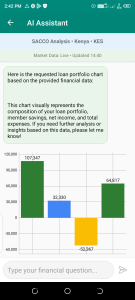
AI in Finance
Leverage Artificial Intelligence to streamline financial operations, automate routine tasks, and gain valuable business insights.
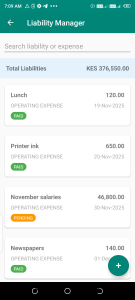
Loan Management
Create and manage loans, track repayments, monitor outstanding balances, and maintain accurate borrower records.
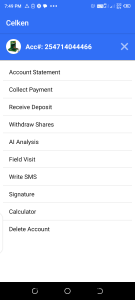
Member Management
Maintain a complete database of members, customers, guarantors, and borrowers with advanced search and filtering capabilities.
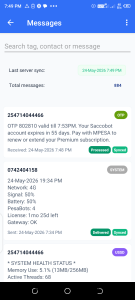
Unlimited SMS Communication
Send payment reminders, due-date notifications, member updates, collection notices, and important announcements directly from the app.
Responsive CRM
Manage customer interactions, communication history, and lending relationships through an integrated Customer Relationship Management system.
Linked Branches
Connect multiple branches and monitor performance from a centralized platform, making Saccobot ideal for growing organizations.
Advanced Security
Protect your data with enterprise-grade security features including:
• Two-Factor Authentication (2FA)
• End-to-End Encryption
• Secure Access Controls
• Protected Financial Records
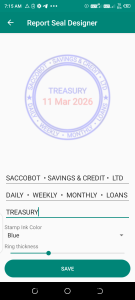
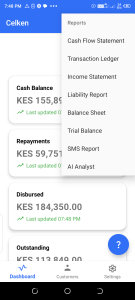
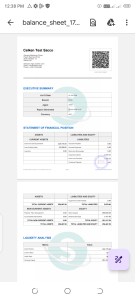
Professional PDF Reports
Generate detailed PDF reports including:
• Member Statements
• Loan Statements
• Collection Reports
• Financial Reports
• Performance Reports
• Portfolio Analysis
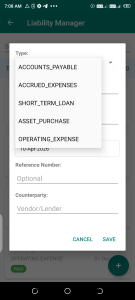
Financial Compliance
Designed with GAAP and IFRS reporting principles in mind to support professional financial record keeping and reporting.
Perfect For
• ROSCAs
• SACCOS
• Chamas
• Village Savings Groups
• Community Lending Groups
• Microfinance Institutions
• Shylocks
• Small Loan Businesses
• Cooperative Societies
Why Choose Saccobot?
✓ Easy to Use
✓ Fast and Reliable
✓ Works on Android Devices
✓ Unlimited SMS Notifications
✓ Secure and Encrypted
✓ AI-Powered Operations
✓ Professional Financial Reports
✓ Multi-Branch Support
✓ Affordable Subscription Plans
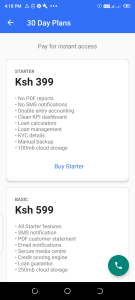
Subscription Packages
Starter — KSh 399/month
Basic — KSh 599/month
Gold — KSh 799/month
Premium (Most Popular) — KSh 999/month
Special Offer
Annual Subscription: KSh 3,999
Offer valid until 13 September 2026.
Support, Installation & Permissions Guide
Installing Saccobot on Android
Saccobot is distributed directly by our team and is installed by sideloading the APK package onto your Android device.
Step 1: Download the APK
Obtain the latest Saccobot installation package (APK) from an official Saccobot representative or authorized download link.
Step 2: Allow Installation from Unknown Sources
Depending on your Android version:
Open Settings
Go to Security or Apps
Select Install Unknown Apps
Choose the browser or file manager used to download the APK
Enable Allow from this Source
Step 3: Install Saccobot
Open the downloaded APK file
Tap Install
Wait for installation to complete
Tap Open
If Installation is Blocked
Some devices may display warnings because Saccobot uses advanced business features such as SMS communication, customer management, location verification, document scanning, and secure authentication.
If Android displays a warning:
Verify the APK was obtained from an authorized Saccobot source.
Continue installation if you trust the source.
Follow the permission instructions below after installation.
Samsung Devices (Important)
Some Samsung devices apply additional restrictions to applications that request sensitive business permissions such as SMS and Phone access.
If certain features are not working:
Open Settings
Go to Apps
Select Saccobot
Open Permissions
Grant all requested permissions
Open Battery
Select Unrestricted or Don't Optimize
Restart the application
For some Samsung models:
Open Settings
Apps
Saccobot
Tap the three-dot menu (if available)
Allow additional or restricted permissions when prompted
Xiaomi, Redmi & POCO Devices
Open Settings
Apps
Manage Apps
Saccobot
Enable all permissions
Enable Autostart
Disable battery optimization for Saccobot
Tecno, Infinix & Itel Devices
Open Settings
Apps
Saccobot
Permissions
Grant all permissions
Disable battery optimization
Allow background activity
Required Permissions
Saccobot only requests permissions necessary for providing its financial management and communication features.
Camera
Used for:
• Capturing member photos
• Document verification
• Profile images
• Receipt and document scanning
Location
Used for:
• Branch verification
• Field collections support
• Activity logging
• Security monitoring
Microphone
Used for:
• Audio recording features
• Future AI-assisted voice functionality
Phone
Used for:
• One-tap calling of members and borrowers
• Contacting guarantors
• Customer support features
SMS
Used for:
• Payment reminders
• Loan notifications
• Collection alerts
• Member communication
• Automated SMS workflows
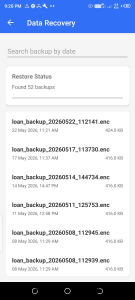
Storage
Used for:
• PDF report generation
• Exporting financial reports
• Saving statements
• Importing and backing up data
Recommended Permission Setup
For the best experience, grant all requested permissions during initial setup.
Without some permissions, certain features such as:
• SMS notifications
• PDF exports
• Camera scanning
• Calling members
• Branch verification
may not function correctly.
Need Help?
If you experience installation issues, permission warnings, activation problems, or require assistance setting up your organization:
? Call or WhatsApp Support
+254 714 044 466
Our team will guide you through installation, activation, data migration, and onboarding.
Saccobot is a powerful Android application designed to help ROSCAs, SACCOS, chamas, microfinance institutions, and small lenders automate their operations, improve efficiency, and grow with confidence.
Built specifically for the Kenyan market, Saccobot combines modern financial management tools, Artificial Intelligence, customer relationship management, secure communication, and advanced reporting into one easy-to-use platform.
Whether you manage a small lending group, a growing SACCO, or multiple lending branches, Saccobot gives you everything you need to manage members, loans, savings, repayments, collections, and financial reporting from your phone.
Key Features
AI in Finance
Leverage Artificial Intelligence to streamline financial operations, automate routine tasks, and gain valuable business insights.
Loan Management
Create and manage loans, track repayments, monitor outstanding balances, and maintain accurate borrower records.
Member Management
Maintain a complete database of members, customers, guarantors, and borrowers with advanced search and filtering capabilities.
Unlimited SMS Communication
Send payment reminders, due-date notifications, member updates, collection notices, and important announcements directly from the app.
Responsive CRM
Manage customer interactions, communication history, and lending relationships through an integrated Customer Relationship Management system.
Linked Branches
Connect multiple branches and monitor performance from a centralized platform, making Saccobot ideal for growing organizations.
Advanced Security
Protect your data with enterprise-grade security features including:
• Two-Factor Authentication (2FA)
• End-to-End Encryption
• Secure Access Controls
• Protected Financial Records
Professional PDF Reports
Generate detailed PDF reports including:
• Member Statements
• Loan Statements
• Collection Reports
• Financial Reports
• Performance Reports
• Portfolio Analysis
Financial Compliance
Designed with GAAP and IFRS reporting principles in mind to support professional financial record keeping and reporting.
Perfect For
• ROSCAs
• SACCOS
• Chamas
• Village Savings Groups
• Community Lending Groups
• Microfinance Institutions
• Shylocks
• Small Loan Businesses
• Cooperative Societies
Why Choose Saccobot?
✓ Easy to Use
✓ Fast and Reliable
✓ Works on Android Devices
✓ Unlimited SMS Notifications
✓ Secure and Encrypted
✓ AI-Powered Operations
✓ Professional Financial Reports
✓ Multi-Branch Support
✓ Affordable Subscription Plans
Subscription Packages
Starter — KSh 399/month
Basic — KSh 599/month
Gold — KSh 799/month
Premium (Most Popular) — KSh 999/month
Special Offer
Annual Subscription: KSh 3,999
Offer valid until 13 September 2026.
Support, Installation & Permissions Guide
Installing Saccobot on Android
Saccobot is distributed directly by our team and is installed by sideloading the APK package onto your Android device.
Step 1: Download the APK
Obtain the latest Saccobot installation package (APK) from an official Saccobot representative or authorized download link.
Step 2: Allow Installation from Unknown Sources
Depending on your Android version:
Open Settings
Go to Security or Apps
Select Install Unknown Apps
Choose the browser or file manager used to download the APK
Enable Allow from this Source
Step 3: Install Saccobot
Open the downloaded APK file
Tap Install
Wait for installation to complete
Tap Open
If Installation is Blocked
Some devices may display warnings because Saccobot uses advanced business features such as SMS communication, customer management, location verification, document scanning, and secure authentication.
If Android displays a warning:
Verify the APK was obtained from an authorized Saccobot source.
Continue installation if you trust the source.
Follow the permission instructions below after installation.
Samsung Devices (Important)
Some Samsung devices apply additional restrictions to applications that request sensitive business permissions such as SMS and Phone access.
If certain features are not working:
Open Settings
Go to Apps
Select Saccobot
Open Permissions
Grant all requested permissions
Open Battery
Select Unrestricted or Don't Optimize
Restart the application
For some Samsung models:
Open Settings
Apps
Saccobot
Tap the three-dot menu (if available)
Allow additional or restricted permissions when prompted
Xiaomi, Redmi & POCO Devices
Open Settings
Apps
Manage Apps
Saccobot
Enable all permissions
Enable Autostart
Disable battery optimization for Saccobot
Tecno, Infinix & Itel Devices
Open Settings
Apps
Saccobot
Permissions
Grant all permissions
Disable battery optimization
Allow background activity
Required Permissions
Saccobot only requests permissions necessary for providing its financial management and communication features.
Camera
Used for:
• Capturing member photos
• Document verification
• Profile images
• Receipt and document scanning
Location
Used for:
• Branch verification
• Field collections support
• Activity logging
• Security monitoring
Microphone
Used for:
• Audio recording features
• Future AI-assisted voice functionality
Phone
Used for:
• One-tap calling of members and borrowers
• Contacting guarantors
• Customer support features
SMS
Used for:
• Payment reminders
• Loan notifications
• Collection alerts
• Member communication
• Automated SMS workflows
Storage
Used for:
• PDF report generation
• Exporting financial reports
• Saving statements
• Importing and backing up data
Recommended Permission Setup
For the best experience, grant all requested permissions during initial setup.
Without some permissions, certain features such as:
• SMS notifications
• PDF exports
• Camera scanning
• Calling members
• Branch verification
may not function correctly.
Need Help?
If you experience installation issues, permission warnings, activation problems, or require assistance setting up your organization:
? Call or WhatsApp Support
+254 714 044 466
Our team will guide you through installation, activation, data migration, and onboarding.
Updated on
Jun 02, 2026
