Auth Sync

Auth Sync icon
4.3
0 reviews
0
Downloads
141.6 MB
Size
12+
Year Old
Install
Share

About this app

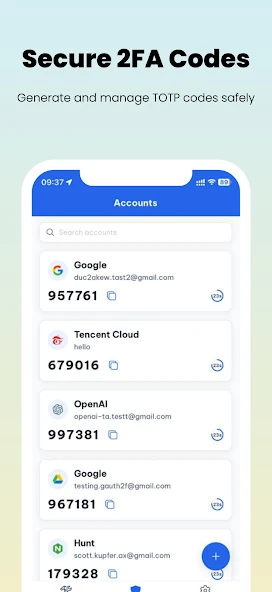
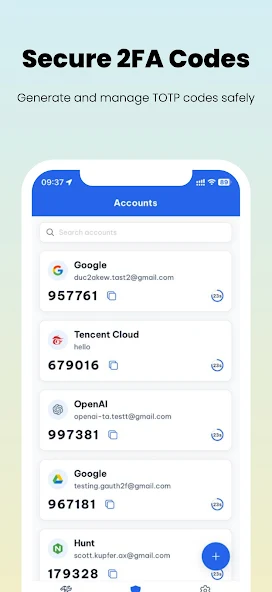
Auth Sync is a simple and secure authenticator app for Two-Factor Authentication (2FA) using TOTP. Generate, manage, and protect your one-time codes offline, with optional end-to-end encrypted cloud sync when you need it.

? Key Features:
• Generate & manage TOTP codes offline – safe, reliable, always available.
• Quick add via QR scan or manual input (6/8 digits, SHA1/256/512, 30s/60s).
• Organized folders and search to find codes faster.
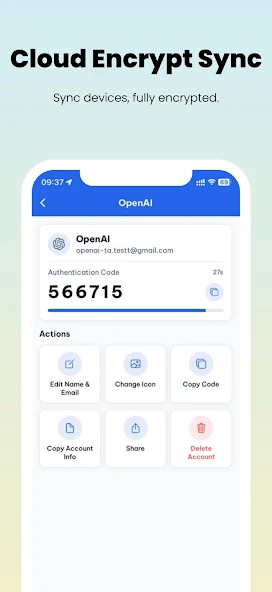
• End-to-end encrypted (E2EE) Cloud Sync across devices – zero knowledge.
• Secure sharing between your own devices only.
• Export/Import encrypted backups for long-term safety.
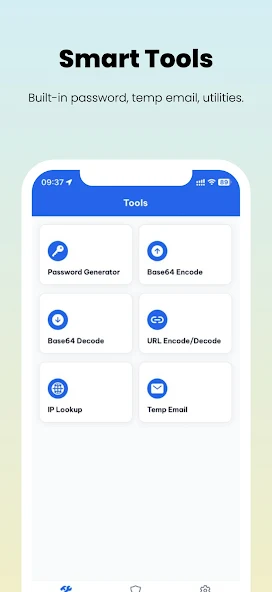
• Extra tools: Password Generator, Temporary Email, Base64 encode/decode.
• App lock with Face ID / Fingerprint / Passcode.
• Local encrypted backups with Files or Google Drive.

? Privacy First:
• TOTP secrets are always stored encrypted.
• We do not collect or sell your TOTP data.
• Only minimal data (email for login, crash reports) is used for sync and diagnostics.

⚡ How it works:
1. Open the app and add your first account (scan QR or enter secret).
2. Use codes offline instantly.
3. Sign in only when you want to sync across devices.
4. Export or import encrypted backups anytime.

Auth Sync keeps your accounts protected and makes 2FA easier than ever.

Updated on

Mar 05, 2026

TOOLS

Ratings and reviews

4.3
0 reviews
5
4
3
2
1
Abc Xyz
July 22, 2024
The interface is good and the shopping is super smooth.
12efa asd
July 22, 2024
Great experience, great deals.

App support

Website
Support email

Similar apps

APP_NAME
APP_DEVELOPER
4.3
Auth Sync icon
Auth Sync
Share this app
X
Facebook
WhatsApp
Email
Copy
Auth Sync icon
Auth Sync
About this app
Auth Sync is a simple and secure authenticator app for Two-Factor Authentication (2FA) using TOTP. Generate, manage, and protect your one-time codes offline, with optional end-to-end encrypted cloud sync when you need it.

? Key Features:
• Generate & manage TOTP codes offline – safe, reliable, always available.
• Quick add via QR scan or manual input (6/8 digits, SHA1/256/512, 30s/60s).
• Organized folders and search to find codes faster.
• End-to-end encrypted (E2EE) Cloud Sync across devices – zero knowledge.
• Secure sharing between your own devices only.
• Export/Import encrypted backups for long-term safety.
• Extra tools: Password Generator, Temporary Email, Base64 encode/decode.
• App lock with Face ID / Fingerprint / Passcode.
• Local encrypted backups with Files or Google Drive.

? Privacy First:
• TOTP secrets are always stored encrypted.
• We do not collect or sell your TOTP data.
• Only minimal data (email for login, crash reports) is used for sync and diagnostics.

⚡ How it works:
1. Open the app and add your first account (scan QR or enter secret).
2. Use codes offline instantly.
3. Sign in only when you want to sync across devices.
4. Export or import encrypted backups anytime.

Auth Sync keeps your accounts protected and makes 2FA easier than ever.
Version
1.1.0
Updated on
Mar 05, 2026
Released on
Mar 05, 2026
Downloads
0 downloads
Auth Sync icon

Auth Sync

Version:1.1.0 (build 3)
Auth Sync QRcode
App installation is in progress
Installing...
App download will begin in a moment, please wait... If it doesn\'t, please restart the download.
Install

Or use your mobile to scan the QR code to install


About

Size
141.6 MB
Publish at
2026-03-05
Version
1.1.0
Build
3

1.1.0 (build 2) 2026-03-05
1.0.0 (build 1) 2025-08-05

Auth Sync is a simple and secure authenticator app for Two-Factor Authentication (2FA) using TOTP. Generate, manage, and protect your one-time codes offline, with optional end-to-end encrypted cloud sync when you need it.

? Key Features:
• Generate & manage TOTP codes offline – safe, reliable, always available.
• Quick add via QR scan or manual input (6/8 digits, SHA1/256/512, 30s/60s).
• Organized folders and search to find codes faster.
• End-to-end encrypted (E2EE) Cloud Sync across devices – zero knowledge.
• Secure sharing between your own devices only.
• Export/Import encrypted backups for long-term safety.
• Extra tools: Password Generator, Temporary Email, Base64 encode/decode.
• App lock with Face ID / Fingerprint / Passcode.
• Local encrypted backups with Files or Google Drive.

? Privacy First:
• TOTP secrets are always stored encrypted.
• We do not collect or sell your TOTP data.
• Only minimal data (email for login, crash reports) is used for sync and diagnostics.

⚡ How it works:
1. Open the app and add your first account (scan QR or enter secret).
2. Use codes offline instantly.
3. Sign in only when you want to sync across devices.
4. Export or import encrypted backups anytime.

Auth Sync keeps your accounts protected and makes 2FA easier than ever.
Expand

Auth Sync Screenshots1
Auth Sync Screenshots2
Auth Sync Screenshots3
Auth Sync Screenshots4
Auth Sync Screenshots5