

TapSave

TapSave icon
4.5
Rating
59.2 MB
Size
12+
Year Old
Install
Share
App screenshot 1
App screenshot 2
App screenshot 3
App screenshot 4
App screenshot 5

About this app

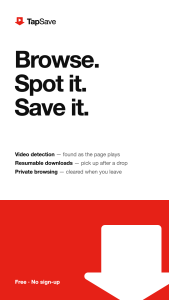
TapSave is a lightweight browser that spots the videos on the page you're viewing and lets you save them to your phone.

HOW IT WORKS
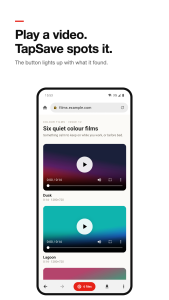
• Open any web page and play the video.
• The red button at the bottom lights up with the number of videos found.
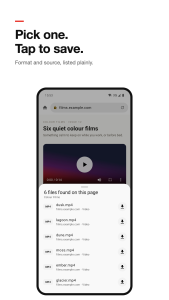
• Pick the quality you want and tap Save. That's it.

FEATURES
• Video detection – finds video and audio files as the page loads, including streaming (HLS) playlists.
• Paste a link – share a video link to TapSave or paste it to save the video directly.
• Reliable downloads – downloads run in the background, can be paused and resumed, and retry after network drops.
• Checked files – every file is verified before it's saved, so you never get a half-finished copy.
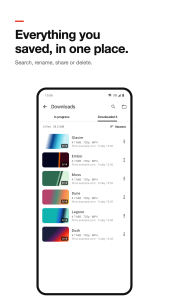
• File manager – browse, search, rename, share and delete what you've saved.
• Bookmarks and history – keep the sites you like and find pages you visited.
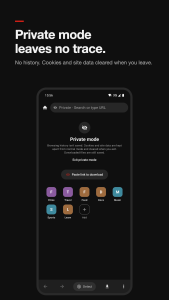
• Private mode – separate cookies and site data, no history, everything cleared when you leave.
• Clean, calm design with light and dark themes.

PLEASE NOTE
• Only save content you own or have permission to download, and follow each website's terms.
• DRM-protected, paid or members-only content isn't supported.
• TapSave isn't affiliated with any website or video platform.

Updated on

Oct 30, 2026

Ratings and reviews

4.5
out of 5
5
4
3
2
1
Abc Xyz
July 22, 2024
The layout is clear, and the main features are easy to find. It did not take long to get familiar with it.
12efa asd
July 22, 2024
Easy to get started. A few small details could be smoother, but overall it is straightforward to use.

App support

Website
Support email

Similar apps

APP_NAME
APP_DEVELOPER
4.5
TapSave icon
TapSave
Share this app
X
Facebook
WhatsApp
Email
Copy
TapSave icon
TapSave
About this app
TapSave is a lightweight browser that spots the videos on the page you're viewing and lets you save them to your phone.

HOW IT WORKS
• Open any web page and play the video.
• The red button at the bottom lights up with the number of videos found.
• Pick the quality you want and tap Save. That's it.

FEATURES
• Video detection – finds video and audio files as the page loads, including streaming (HLS) playlists.
• Paste a link – share a video link to TapSave or paste it to save the video directly.
• Reliable downloads – downloads run in the background, can be paused and resumed, and retry after network drops.
• Checked files – every file is verified before it's saved, so you never get a half-finished copy.
• File manager – browse, search, rename, share and delete what you've saved.
• Bookmarks and history – keep the sites you like and find pages you visited.
• Private mode – separate cookies and site data, no history, everything cleared when you leave.
• Clean, calm design with light and dark themes.

PLEASE NOTE
• Only save content you own or have permission to download, and follow each website's terms.
• DRM-protected, paid or members-only content isn't supported.
• TapSave isn't affiliated with any website or video platform.
Version
0.6.2
Updated on
Oct 30, 2026
Released on
Oct 30, 2026
TapSave icon

TapSave

Version:0.6.2 (build 3)
TapSave QRcode
App installation is in progress
Installing...
App download will begin in a moment, please wait... If it doesn\'t, please restart the download.
Install

Or use your mobile to scan the QR code to install


About

Size
59.2 MB
Publish at
2026-10-30
Version
0.6.2
Build
3

0.5.0 (build 2) Brand new launch ? 2026-10-22
0.5.0 (build 1) First release of TapSave. Brow 2026-10-22

TapSave is a lightweight browser that spots the videos on the page you're viewing and lets you save them to your phone.

HOW IT WORKS
• Open any web page and play the video.
• The red button at the bottom lights up with the number of videos found.
• Pick the quality you want and tap Save. That's it.

FEATURES
• Video detection – finds video and audio files as the page loads, including streaming (HLS) playlists.
• Paste a link – share a video link to TapSave or paste it to save the video directly.
• Reliable downloads – downloads run in the background, can be paused and resumed, and retry after network drops.
• Checked files – every file is verified before it's saved, so you never get a half-finished copy.
• File manager – browse, search, rename, share and delete what you've saved.
• Bookmarks and history – keep the sites you like and find pages you visited.
• Private mode – separate cookies and site data, no history, everything cleared when you leave.
• Clean, calm design with light and dark themes.

PLEASE NOTE
• Only save content you own or have permission to download, and follow each website's terms.
• DRM-protected, paid or members-only content isn't supported.
• TapSave isn't affiliated with any website or video platform.
Expand

TapSave Screenshots1
TapSave Screenshots2
TapSave Screenshots3
TapSave Screenshots4
TapSave Screenshots5

Feedback

Submit questions you've encountered during the process or suggestions for the app to the developer of the app to help them do better.