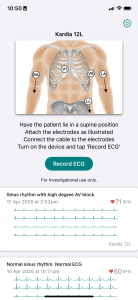
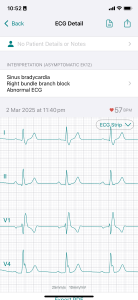
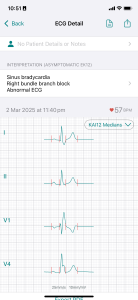
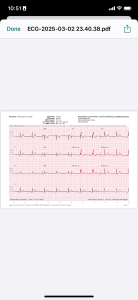
Kardia12 is a mobile app that allows users to record ECGs using various AliveCor devices, including the Kardia 12L, KardiaMobile 6L, and KardiaMobile Card. It can be configured for Health Professionals or Personal Use, and provides options for configuring device settings, managing patient information, selecting lead sets and analysis modes, and exporting recordings as PDF reports. The app also includes features such as live web streaming for remote monitoring, support for prototype devices, and the ability to upload recorded ECGs to cloud storage.
Cloud Storage Enhancements
Cloud storage now indicates Uploaded, Pending, or None states with icons. Manual and selective uploads are supported. With Auto Save enabled, only new recordings upload automatically; updates to existing files are re-uploaded even if Auto Save is off.
Home Screen Improvements
ECG list items now have a context menu with options to View PDF, Share PDF, Upload to Cloud, and Delete.
Re-Analysis
The Re-analyze option is always available, allowing older ECGs to be processed using the latest KAI or KAI12 analysis libraries.
KAI12 Interpretation Update
Changed interpretation for unanalyzable ECGs from “Analysis failed” to “No analysis result.”
PDF Viewer Improvements
Enhanced PDF viewer, especially on iPad. PDF View and Share buttons are now enabled by default on the Review screen.
Non-Standard Lead Set Support
Added support for synthesis, KAI12 analysis, and median beats for non-standard lead sets including (I, II, V3) and (I, II, V1, V6).
Cloud Account Persistence
Cloud Account ID is now saved to the Keychain, persisting across app uninstall/reinstall.
KAI12 Bug Fixes
Fixed potential crashes related to buffer indexing overflow and downsampling of 500sps ECGs from KKM12L V2.
Corrected Order of Electrodes
Corrected electrode display order in the Recording screen for KM12L V2 and Puck devices.
EK12 Prefiltering Change
Changed EK12 analysis prefiltering from 0.1–100 Hz to 0.1–150 Hz to narrow pacing spikes and improve V6–V1 interval measurement.
Improved V1-V6 Features for Pacing Labs
Added leadset (I, II, V1, V6) option. Fixed V1–V6 interval measurement.
RWPT Medians
RWPT Medians view is now only available when both V1 and V6 are measured, requiring either the (I, II, V1, V6) leadset or an 8-channel recording from KM12L V2.
Installation guide
Install on your iPhone
Open this page
Use your iPhone to open this app’s download page.
Tap Install
Review the version and installation guide, then continue to request installation.
Open the app
Once installation finishes, open the app on your device.
App Privacy
Privacy details not provided
Privacy information is not available on this page. Contact the app provider to learn how this app handles your data.
Cloud Storage Enhancements
Cloud storage now indicates Uploaded, Pending, or None states with icons. Manual and selective uploads are supported. With Auto Save enabled, only new recordings upload automatically; updates to existing files are re-uploaded even if Auto Save is off.
Home Screen Improvements
ECG list items now have a context menu with options to View PDF, Share PDF, Upload to Cloud, and Delete.
Re-Analysis
The Re-analyze option is always available, allowing older ECGs to be processed using the latest KAI or KAI12 analysis libraries.
KAI12 Interpretation Update
Changed interpretation for unanalyzable ECGs from “Analysis failed” to “No analysis result.”
PDF Viewer Improvements
Enhanced PDF viewer, especially on iPad. PDF View and Share buttons are now enabled by default on the Review screen.
Non-Standard Lead Set Support
Added support for synthesis, KAI12 analysis, and median beats for non-standard lead sets including (I, II, V3) and (I, II, V1, V6).
Cloud Account Persistence
Cloud Account ID is now saved to the Keychain, persisting across app uninstall/reinstall.
KAI12 Bug Fixes
Fixed potential crashes related to buffer indexing overflow and downsampling of 500sps ECGs from KKM12L V2.
Corrected Order of Electrodes
Corrected electrode display order in the Recording screen for KM12L V2 and Puck devices.
EK12 Prefiltering Change
Changed EK12 analysis prefiltering from 0.1–100 Hz to 0.1–150 Hz to narrow pacing spikes and improve V6–V1 interval measurement.
Improved V1-V6 Features for Pacing Labs
Added leadset (I, II, V1, V6) option. Fixed V1–V6 interval measurement.
RWPT Medians
RWPT Medians view is now only available when both V1 and V6 are measured, requiring either the (I, II, V1, V6) leadset or an 8-channel recording from KM12L V2.
Kardia12 is a mobile app that allows users to record ECGs using various AliveCor devices, including the Kardia 12L, KardiaMobile 6L, and KardiaMobile Card. It can be configured for Health Professionals or Personal Use, and provides options for configuring device settings, managing patient information, selecting lead sets and analysis modes, and exporting recordings as PDF reports. The app also includes features such as live web streaming for remote monitoring, support for prototype devices, and the ability to upload recorded ECGs to cloud storage.