The interface is good and the shopping is super smooth.
More
12efa asd
July 22, 2024
Great experience, great deals.
More
App Privacy
The developer indicated that the app’s privacy practices may include handling of data as described below. For more information, see the developer’s privacy policy.。
Data Linked to You
The following data may be collected and linked to your identity:
• Introducing PureStatus: Bye Bye Blurry Status: Revolutionize Your WhatsApp Status Experience
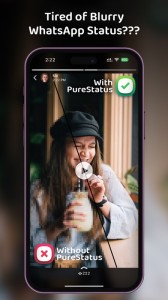
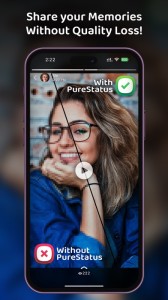
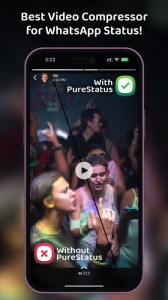
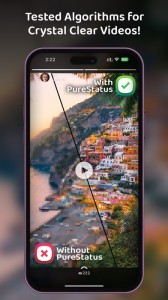
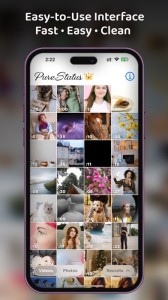
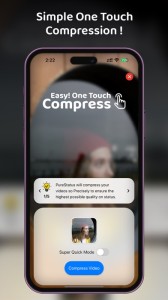
Are you tired of Blurry, Low- Quality videos & Photos in WhatsApp status? Then the “PureStatus” App is made just for you, When you upload a video status, WhatsApp reduces the video size, resulting in reduced video quality, but “PureStatus” will reduce the size of your video very precisely so that there will be the highest possible HD Video Quality on your WhatsApp status.
• Crystal Clear Status Videos in a Few Simple Steps
1. Download PureStatus from the App Store.
2. Open the app,
3. select a video,
4. compress it,
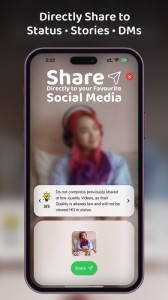
5. Share it to your WhatsApp status and enjoy crystal-clear HD videos!
• Get the Best Results with PureStatus
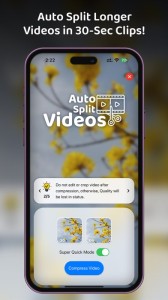
1. Do not edit or crop video after compression, otherwise, Quality will be lost in status.
2. Do not compress previously shared videos, as their quality has already become low and low-quality videos will not be improved for Status. So, Always Compress High-Quality Videos in PureStatus.
3. You can check the Status Quality difference by Uploading Both PureStatus's compressed and your original video on status.
4. Use verticle video & photos in Status as they have more viewing area and they are the most popular on mobile phones.
• Please Keep In Mind
1. PureStatus App will not improve your Original Video Quality but it will stop your HD video from getting blurry in your Whatsapp.
2. Photo function is for uploading HD status only, If you send it in chats, it will be sent as a video.
3. Video Splitter Function is only for uploading longer videos in status. If you use it for chats, they will be sent in 30 seconds parts.
• Experience the Eye-Catching Difference
No more pixel loss when sharing WhatsApp status, thanks to our innovative image & video compressor app. With PureStatus, you can post WhatsApp statuses without compromising video & photo quality.
• Bonus Features
Another benefit of the PureStatus app is the Video Status Splitter facility. With help of a video splitter, your All longer videos will be cut into 30-second parts so that you can upload longer videos in your status. This Status splitter is very accurate in splitting the video with keeping the best possible HD video quality.
Unlock the true potential of your WhatsApp status with PureStatus HD Status Compressor! Download now and start sharing your high-quality videos with the world!
Terms of Use: https://www.apple.com/legal/internet-services/itunes/dev/stdeula/
LOADLY.IOTips.
1. This application comes from a third-party product and its content is not controlled by LOADLY, so please screen it carefully and install it with caution. LOADLY internal testing service platform provides application testing hosting and application crash detection services for third-party applications. LOADLY only provides internal testing support for third-party applications, and does not involve any manual editing or collation, nor does it participate in the content development or external operation of any application, and does not have any affiliation with third-party applications, and does not provide any guarantee or commitment.
2. Please check the quality of applications carefully, and do not install applications from unreliable sources because of spam, emails, text descriptions, etc. Please make your own judgement and install trusted applications based on the source of the application installation link. LOADLY is not responsible for the rules, policies, or specific content of applications published through LOADLY or links to other sites displayed on LOADLY. LOADLY shall not be liable for any investment or purchase made as a result, click here to see more.
Tips.
1. This application comes from a third-party product and its content is not controlled by LOADLY, so please screen it carefully and install it with caution. LOADLY internal testing service platform provides application testing hosting and application crash detection services for third-party applications. LOADLY only provides internal testing support for third-party applications, and does not involve any manual editing or collation, nor does it participate in the content development or external operation of any application, and does not have any affiliation with third-party applications, and does not provide any guarantee or commitment.
2. Please check the quality of applications carefully, and do not install applications from unreliable sources because of spam, emails, text descriptions, etc. Please make your own judgement and install trusted applications based on the source of the application installation link. LOADLY is not responsible for the rules, policies, or specific content of applications published through LOADLY or links to other sites displayed on LOADLY. LOADLY shall not be liable for any investment or purchase made as a result, click here to see more.