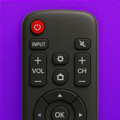
Universal TV Remote Control lets you control multiple smart TVs using just one app. No need to switch between different remotes!
Manage all your TVs from a single interface.
Connect your phone to the same Wi‑Fi network as your TV, and you’re ready to go. Navigate menus, adjust the volume, switch inputs, launch apps, or type using your phone’s keyboard, all in seconds. Whether you’re streaming, gaming, or just watching regular TV, control stays right in your hand.
Supports many TV Brands:
• LG
• Samsung
• Roku
• Fire TV
• Vizio TV
• Android TV / Google TV
• Many models of Philips, TCL, Onn, etc..
Note: Some tv models of the brands may not be supported for remote control by the app.
Features:
• Auto‑detect TVs on the same Wi‑Fi network
• Works with leading brands including LG, Samsung, Roku, Fire TV, Vizio TV, Google TV, and Android TV
• Smooth touchpad navigation for effortless browsing and control
• Open apps directly without needing the original remote
• Fast text input through an on‑screen keyboard
• More exciting features!
Note: Feature availability may vary based on the TV brand and model. Some functions may not be supported on certain devices.
So what are you waiting for?
Download Universal TV Remote Control and start controlling your smart tv from your device!
Disclaimer: Universal TV Remote Control is an independent app and is not affiliated with, related to, or in any way associated with any of the brands or companies mentioned within the app or its descriptions, including but not limited to LG, Samsung, Roku, Fire TV, Vizio TV, Android TV, Google TV, Philips, TCL, and Onn.
**************************
Subscriptions & Terms
**************************
The usage of the Universal TV Remote Control ► app requires a valid subscription.
Free trial automatically converts to a paid subscription unless canceled at least 24-hours before the end of the trial period.
Payment will be charged to iTunes Account at confirmation of purchase.
All subscriptions automatically renew if it is not cancelled within 24 hours before the end of the current subscription period. Your account will be charged for the next subscription period up to 24 hours prior to the current subscription expiring. It is not possible to cancel an existing in-app subscription. You can disable the automatic renewal function at any time by adjusting your account settings.
Any unused portion of a free trial period, if offered, will be forfeited when the user purchases a subscription to that publication, where applicable.
Subscriptions may be managed by the user and auto-renewal may be turned off by going to the user's Account Settings after purchase.
Privacy Policy and Terms of Use:
https://www.algotwist.com/apps/tv-remote/privacy-policy-and-terms-of-use